Development of a Real-Time Synchronized Subtitle System for Theaters
MediaA case study of building a digital solution for synchronized subtitle support during theatrical performances: a mobile app (iOS / Android), backend API, and web admin panel for centralized real-time show control.
Project Overview
Accessibility Tech / Cultural Digital Platform • Mobile + Admin Panel
Project type: mobile application (iOS / Android) + administrative panel.
Format: a digital service for synchronized subtitle support during theatrical performances.
Client: non-profit organization.
Team role: full-cycle development — analytics, design, architecture, backend, mobile, admin panel, release, support, and product evolution.
Project Idea
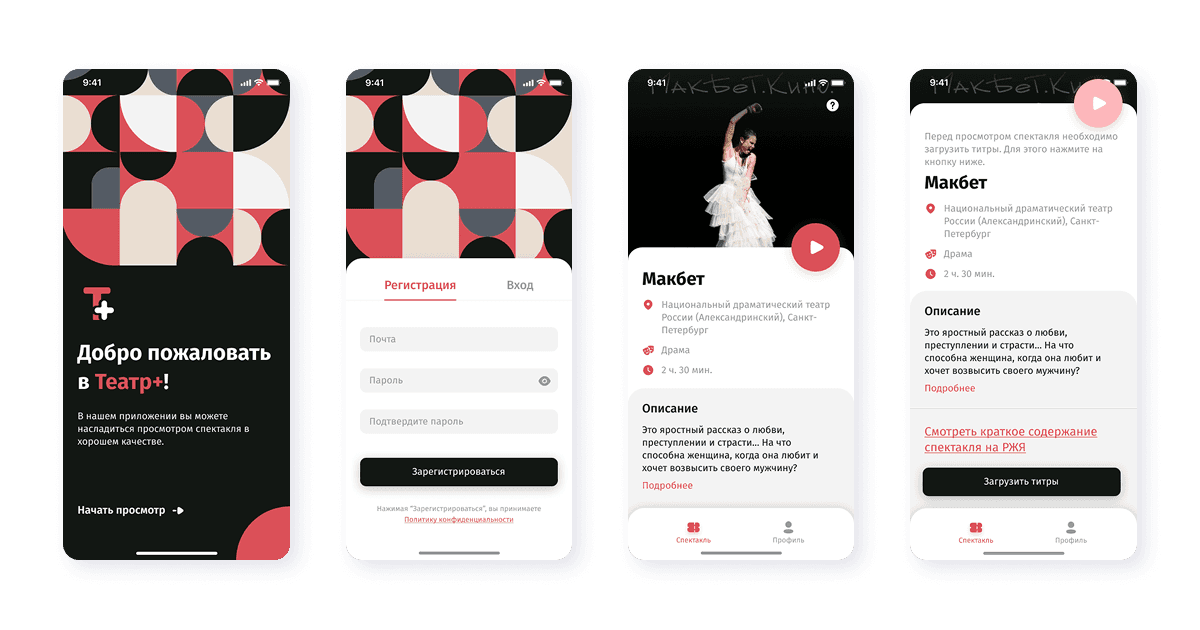
Theatre+ is a mobile service that enables people with hearing impairments to fully experience theatrical performances.
During a performance, the user:
- Selects a performance in the app
- Arrives at the theater
- Starts the selected show
- Receives synchronized subtitles in real time
Subtitles are displayed in sync with the action on stage.
The app became a digital inclusion tool within the cultural space.
Business and Social Challenge
Core objective
Build a technology solution that:
- makes theater accessible to deaf and hard-of-hearing audiences;
- synchronizes an offline event (a stage performance) with a mobile application;
- enables administrators to manage subtitles centrally.
Key requirements
- real-time synchronization;
- centralized timing control;
- support for many devices simultaneously;
- a user-friendly interface for audience members;
- a simple admin panel for theater staff.
Solution Architecture
The project was built as a client-server system with centralized synchronization management:
Mobile App (React Native)
↓
Backend API (Node.js)
↓
PostgreSQL
↓
Admin Panel (React)
A defining feature of the project was centralized control of performance synchronization across all devices through the admin panel.
Mobile App Functionality
1. Performance selection
- a list of available performances;
- performance description;
- selection of the current session.
2. Synchronized subtitles
- starting the performance in the app;
- real-time text display;
- automatic content updates;
- response to administrator commands (start, pause, rewind).
3. Display management
- responsive layout for different devices;
- comfortable reading in theater lighting conditions;
- minimalist interface with no distracting elements.
Administrative Panel
A web-based control panel was developed for theater staff:
Content management
- creating performances;
- adding scenes and text blocks;
- editing and structuring subtitles.
Synchronization management
- starting the performance;
- pausing;
- rewinding;
- setting precise timing;
- controlling text display across all connected devices.
The administrator could manage in real time exactly what audience members saw in the theater.
Synchronization Mechanics
One of the key technical challenges was text synchronization:
- centralized delivery of the performance state;
- content updates across all connected devices;
- proper handling of desynchronization;
- reliable operation under unstable internet conditions.
The solution ensured a single consistent state for all users.
Technology Stack
Mobile
Backend
Admin Panel
ReactProject Challenges
1. Synchronizing an offline event with mobile devices
The system had to ensure:
- simultaneous text updates on dozens of devices;
- correct handling of pause and rewind actions;
- resilience to network latency.
2. UX in a theater environment
The product had to account for low lighting, the need for large readable text, and the absence of distracting interface elements.
3. Ease of administration
Theater staff are not technical specialists, so the interface had to be as intuitive as possible.
Project Evolution
After launch, the project continued to evolve actively over the course of a year:
- interface improvements;
- synchronization optimization;
- stability enhancements;
- refinement of performance control scenarios.
Later, the client decided to pause the project.
What the Team Is Proud Of
- Delivering a socially impactful product
- Integrating an offline scenario with a digital service
- Building a centralized synchronization system
- Creating a convenient administrative panel
- Providing full-cycle turnkey development
Outcome
Theatre+ is an example of a project where technology serves cultural accessibility.
We delivered: a mobile app for audience members, an administrative system for performance management, a real-time synchronization architecture, and a scalable backend platform.
The project demonstrated our expertise in real-time systems, mobile development, inclusive digital products, and full-cycle product delivery.
Want to discuss your project?
Get in touch, and we’ll show you how we can help bring your idea to life